
Prior Authorization Workflow for Family Medicine Practices


Family medicine physicians handle about 39 prior authorizations a week each, per AMA 2024 survey data. In a three-provider practice, that scales to thousands a year, and most of the work lands on clinical staff who should be doing clinical work.
Most practice owners and clinic managers already know this. What they want to know is how to fix it.
This guide walks you through what a working prior authorization workflow looks like in a family medicine setting. We will cover the three pitfalls that quietly drain time and revenue from otherwise well-run practices, and where remote support, specifically medical virtual assistants, fits into the picture of family medicine practice. For independent practice owners and clinic managers facing the question of how to handle PA, whether going for in-house staff, automation, or some combination of both, this guide is for you.
Just to be clear up front, this is not an argument that humans always beat AI for prior authorization, or vice versa. The honest answer is more nuanced. We will cover where each approach works best, and where the combination outperforms either one alone.
How Prior Authorization Hits Family Medicine
Family medicine sees a wider range of prior authorization scenarios than almost any other outpatient specialty. A single Tuesday morning can involve a pediatric ADHD medication refill, a GLP-1 approval for an adult patient with type 2 diabetes, a DME order for an elderly patient's mobility aid, a specialty referral for a chronic pain workup, and a formulary exception for a generic the insurer suddenly stopped covering.
That breadth is the problem.
Most specialty practices deal with a relatively narrow set of payer rules and clinical criteria. Family medicine touches all of them, across pediatric Medicaid, commercial PPOs, Medicare Advantage plans, and everything in between. Every payer has its own portal, its own criteria, its own fax line, and its own appeal process.
The compounding effect is what makes family medicine practices the most likely to need outside help with PA. A cardiology group running 40 cardiac stress test pre-auths a week has a repeatable workflow. A family medicine practice running 40 prior auths a week is running 40 different workflows, depending on the medication, payer, age of patient, and clinical context.
This is the part most generic prior authorization advice misses.
Steps in Prior Authorization Workflow for Family Medicine
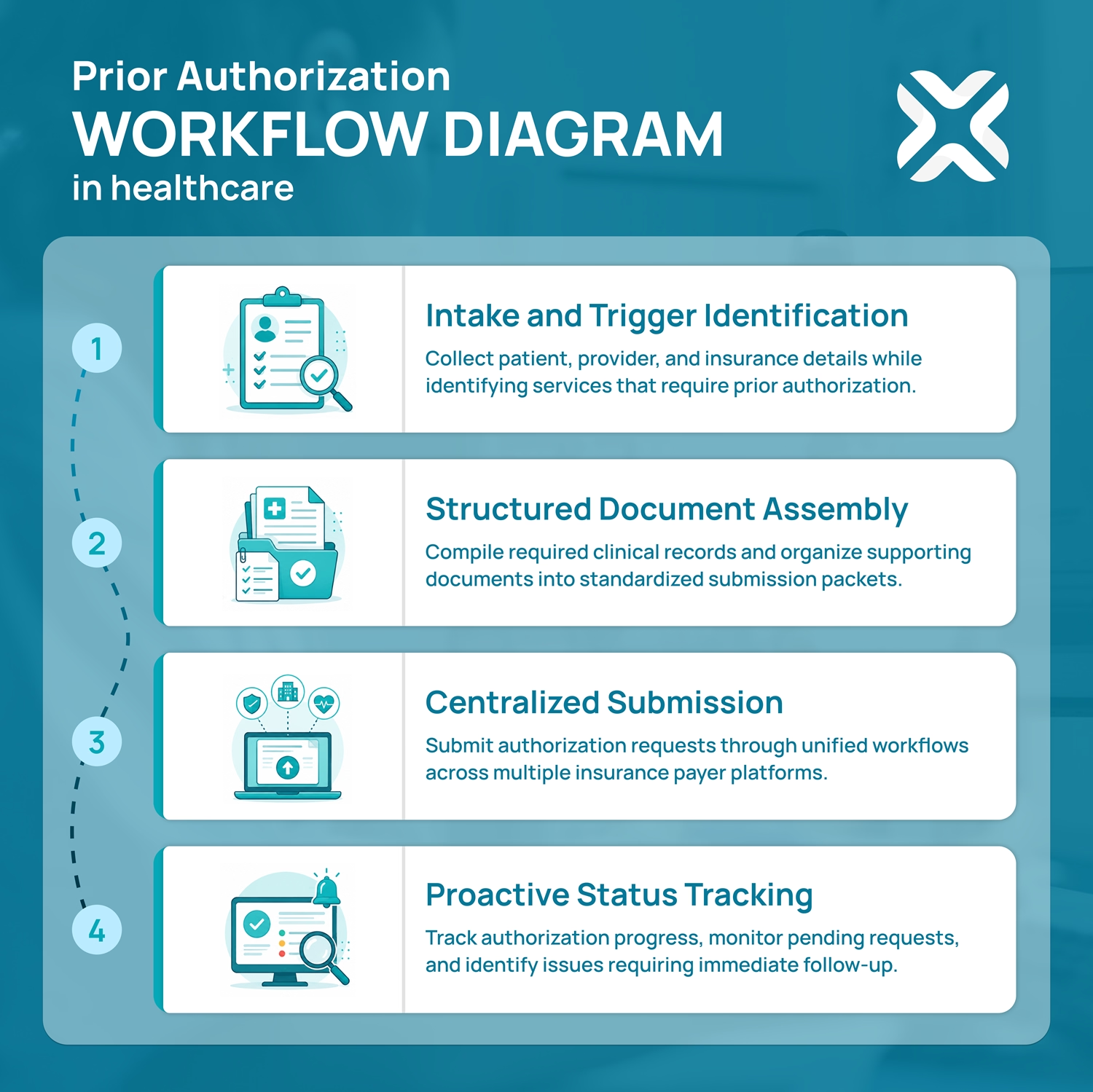
A workable prior authorization workflow has four sequential steps. Most practices have versions of all four already. The question is whether those steps are connected, owned, and tracked, or whether each step is a separate fire someone has to put out.
Step 1: Intake and Trigger Identification
The earlier you catch a PA requirement, the smoother everything downstream gets. That means flagging prior auth needs at the moment a script is written or an order is placed, not when the pharmacy calls back two days later saying the patient cannot get the medication.
For family medicine, the spots that matter most are:
- Front-desk staff trained to flag common PA triggers during scheduling, such as well-child visits with imaging, ADHD med renewals, GLP-1 prescriptions, and DME orders
- EHR integrations that auto-check formularies against the patient's insurance at the point of prescribing
- A standing internal list of "we always need PA for X with Y payer" that the team updates monthly
This step alone, done well, eliminates the most common cause of PA chaos: discovering the requirement too late.
Step 2: Structured Document Assembly
Most PA denials are administrative, not clinical. The medication is appropriate, the patient meets criteria, the doctor knows what they are doing. The denial happens because the submission was incomplete or formatted wrong.
A structured assembly process catches this before it leaves the office. For each request, gather:
- Relevant chart notes from the most recent visit
- History of failed first-line therapies if step therapy applies
- Lab results or imaging that support medical necessity
- The specific ICD-10 and CPT codes the payer requires (these change, sometimes quietly)
- Any medical necessity letter the payer requires for that specific drug or service
Building a template library for common prior-authorization scenarios can save time, because family physicians are advised to identify repeated PA triggers and track recurring request patterns; common examples include pediatric ADHD medications, GLP-1s, asthma inhalers, DME, and some imaging studies.
Step 3: Centralized Submission
Faxing still exists. So do online portals like CoverMyMeds, Availity, and Surescripts, e-prescribing systems with built-in PA modules, and direct integrations from major EHRs.
The goal is not to use one channel for everything. The goal is to use the right channel for each payer and to log every submission in one place. A spreadsheet works. A dedicated PA tracking tool works better. What does not work is each staff member managing their own pile.
Step 4: Proactive Status Tracking
Once a PA is submitted, the clock starts. Most plans are required to respond within specific timeframes (which vary by state and plan type), but "required to respond" and "actually responds promptly" are not the same thing. Without tracking, requests fall into a hole.
A working tracking rule: every pending PA gets checked at 48 hours, then every business day after, until there is a status. Approvals get logged and communicated to the patient. Denials get triaged within 24 hours.
Three Pitfalls That Drain Family Medicine Practices
Plenty of family medicine practices have all four workflow steps but they still struggle with prior authorization. The reason is usually one of these three pitfalls.
Pitfall 1: The Nurse-as-Clerk Trap
This is the most common and the most expensive. A clinical staff member, usually an RN or LPN, ends up doing PA submissions and tracking because they "know the clinical details." They become the practice's PA expert by default.
The cost math is harsh. If an RN spends 15 hours a week on prior auth tasks that do not require an RN license, the practice is paying RN rates for clerical work.
This is also a leading driver of clinical staff burnout and turnover. RNs and LPNs did not go to school to navigate insurance portals.
Pitfall 2: Fragmented Communication
When prior auth lives in multiple inboxes, multiple sticky notes, and multiple people's heads, three things happen. Submissions get duplicated. Submissions get dropped. And patients call to ask about their PA only to find that no one in the office can tell them where it stands.
A single source of truth for PA status, meaning one tracker, one inbox, and one owner of each request, is the fix. It sounds basic. Most practices do not have it.
Pitfall 3: Passive Waiting on Denials
A denied PA is not the end of the process. Appeals only work when someone owns the next step. In most practices, denied PAs sit because no one has the time, training, or assigned responsibility to push back.
The fix is a documented denial protocol. Every denial triggers a same-day review, a decision about whether to appeal or pivot to an alternative therapy, and a documented next action with an owner and a deadline.
If any of these patterns sound like your practice, MMVA's prior authorization virtual assistants are structured specifically to take this work off your clinical staff without losing oversight.
Reasons Why Prior Authorizations Get Denied (and How to Prevent Them)
Most denials are not the payer disagreeing with the clinical decision. They are the payer rejecting how the request was submitted. That distinction matters, because administrative denials are almost entirely preventable, and they are the kind family medicine sees most.
Here are the reasons that show up over and over, and the move that prevents each one:
Missing or incomplete documentation
The most common reason by far. A chart note is attached, but the specific lab result, prior therapy history, or measurement the payer wants is not. Prevention: build the document checklist into Step 2 so nothing gets submitted half-assembled.
Wrong or unsupported codes
The ICD-10 or CPT code does not match the service, or does not meet the payer's criteria for that drug. These codes change, sometimes quietly. Prevention: verify codes against the payer's current policy at submission, not from memory or last year's template.
Medical necessity not established
The request assumes the reviewer will infer necessity. They will not. Prevention: state it explicitly, with the failed first-line therapy, the diagnosis, and the clinical rationale spelled out in the necessity letter.
Step therapy not documented
The payer requires proof the patient tried and failed a cheaper option first, and the submission does not show it. Prevention: pull the medication history and document the prior trial before submitting, not after the denial lands.
Eligibility lapsed or changed
The patient's coverage shifted and the request went to the wrong plan. Prevention: run a real-time eligibility check as part of intake, every time.
Submitted late or to the wrong channel
The window closed, or the request went to a fax line the payer no longer monitors. Prevention: confirm the current submission method per payer and log the deadline when the case opens.
The pattern across all six is the same: denials are a documentation and process problem, not a clinical one. A workflow with a real document-assembly step and a single owner catches most of them before they ever reach the payer.
Where Medical Virtual Assistants Fit Into the PA Workflow
Prior authorization can be handled by humans, by software, or by some combination. Each approach has real strengths and real limits.
A medical virtual assistant, in this context, is a remote, HIPAA-trained healthcare administrative professional who works as an extension of your practice staff. They log into your systems with their own credentials under proper access controls. They handle submissions, tracking, and follow-up the way an in-house MA would, just from a different location.
AI prior authorization software (CoverMyMeds, Availity AI, athenahealth, Waystar, Notable Health, and others) takes a different approach. The software integrates with the EHR or payer systems and automates portions of the submission and eligibility process.
Both can work. The mistake is treating them as interchangeable.
Where Each Approach Wins
For certain family medicine practices, the realistic answer might be a combination of both. AI software handles the high-volume repeatable submissions, and a human medical virtual assistant handles the exceptions, appeals, payer calls, and the long list of unusual cases that family medicine sees every week.
What a Medical VA Actually Does in a Family Medicine Practice
The day-to-day work usually looks like this. A medical VA pulls the daily schedule, flags upcoming visits and orders that will likely need prior authorization, and initiates the cases. They compile the documentation, submit through the correct channel for each payer, log the submission, and track it to resolution. When a denial comes back, they triage it and either prepare the appeal or escalate to the physician for a clinical decision.
They become the single owner of PA in your practice, which solves both the Nurse-as-Clerk Trap and the Fragmented Communication pitfall in one move.
What to Look For in a PA Virtual Assistant
Not all virtual assistant services are equal, especially in healthcare. The bar to clear:
- HIPAA training that is documented and current
- Demonstrated experience with the EHR you use
- US healthcare familiarity, including payer landscape, common forms, and regulatory context
- English fluency for clean patient communication
- A clear escalation protocol so clinical decisions stay with clinical staff
- Backup coverage so the workflow does not break when one person is out
At MyMedicalVA, our family medicine clients typically pair a virtual assistant with their existing in-house team rather than replacing anyone. The medical VA handles the administrative load, and the clinical staff can focus on clinical work.
ROI: What Family Medicine Practices Actually Save
The numbers vary by practice size and workflow maturity, but the pattern is consistent.
Direct Cost
A typical family medicine Medical Assistant cost per hour versus that of a medical VA hourly rate shows that the gap is real. But the difference in cost is not the only number that matters.
Recovered Clinical Capacity
When an RN or MA gets 12 to 15 hours a week back from PA work, those hours translate into patient triage, visit rooming, refill management, and the dozens of other tasks that actually require their training. That recovered capacity often shows up as faster visit throughput before it shows up in payroll savings.
Reduced Burnout and Turnover
Clinical staff turnover is expensive. Each MA or RN replacement costs in recruiting, onboarding, and lost productivity. Practices that have offloaded administrative work to VAs report meaningful retention improvements in their clinical roles.
One honest note. A VA does not solve everything. Payer behavior, denial rates, slow approval times, and regulatory friction do not change because you hired a medical VA. What changes is who in your practice deals with them, and whether dealing with them comes at the cost of patient care.
A Practical Implementation Checklist
If you are considering bringing on a medical VA for prior authorization, here is a workable sequence.
- Audit your current PA volume: Pull the last 30 days. Count submissions, track average turnaround time, note denial rates, and identify which payers and medication categories generate the most work.
- Map current ownership: Who in your practice touches PA today? How many hours per week? What is their loaded hourly cost?
- Define what you want offloaded: Submissions only? Submissions plus tracking? Plus appeals? Plus patient communication?
- Vet providers carefully: Check HIPAA training documentation, ask for references from family medicine clients specifically, and confirm the EHR experience matches yours.
- Start with a pilot: One or two payers, or one or two medication categories. Measure for 30 days against your audit baseline.
- Build the handoff playbook: Decision rules for what the VA handles independently versus what gets escalated. Documentation standards. Communication cadence with your clinical staff.
- Review at 60 and 90 days: Volume handled, turnaround time, denial rate, staff time recovered. Adjust scope based on what the data shows.
Most family medicine practices find the right scope by month three, not month one. Expect some iteration.
Prior Authorization Metrics Worth Tracking
You cannot improve a workflow you are not measuring. Most family medicine practices track none of these numbers, which is why PA problems stay invisible until a staff member burns out or a patient complains. A handful of metrics, checked monthly, turn prior authorization from a black box into something you can actually manage.
- Turnaround time: How long from PA initiation to a decision, broken out by payer. This is the number patients feel. If one payer consistently runs long, that is where to aim your follow-up.
- First-pass approval rate: The percentage approved without an appeal or resubmission. A low rate points straight at the document-assembly step, not at the payer.
- Denial rate: The percentage denied, ideally split into administrative denials (preventable) and clinical denials (not). A high administrative share is the most fixable problem you have.
- Appeal overturn rate: Of the denials you appeal, how many get reversed. A high overturn rate means you were right to push back, and it is a strong argument for never letting denials sit.
- Time to submission: How long from the trigger (script written, order placed) to the request going out. Long lags here mean the requirement is being caught too late, which is a Step 1 problem.
- Volume per provider, per week: Who generates the most PA work, and whether it is climbing. This is the number that tells you when current staffing has stopped being enough.
- Percentage electronic versus fax: How much of your volume runs through portals or integrations rather than manual fax. As payers move toward electronic prior authorization, a high fax share is a sign your workflow is behind where it needs to be.
None of these require special software to start. A simple monthly tally beats no tally. The point is to know which step in your workflow is actually leaking time, so you fix the right thing instead of guessing.
Prior Authorization Changes in 2026
The rules are shifting, and for once, mostly in the practice's favor. A federal rule from Centers for Medicare & Medicaid Services (CMS), the Interoperability and Prior Authorization Final Rule, started its phased rollout this year and changes how a large share of payers have to handle prior authorization.
What it means in practice:
- Faster decisions: Affected payers now have to respond within set timeframes: 72 hours for urgent requests and seven calendar days for standard ones. That roughly halves the old waiting game for the plans covered.
- Specific denial reasons: Payers can no longer send a bare rejection. They have to say why, which makes appeals faster to build and easier to win.
- Public metrics: Payers have to report their own prior authorization data, including approval, denial, and turnaround numbers. Over time that gives practices real visibility into which plans are slowest.
- A push toward electronic PA: The rule requires payers to stand up standardized electronic prior authorization systems, with the main technical pieces due in 2027. Fax-based PA is on its way out.
The catch: this applies to Medicare Advantage, Medicaid and CHIP managed care, and the marketplace plans, which is a big slice of a typical family medicine panel, but not every commercial plan. So the old manual process is not disappearing overnight. You will be running the new faster electronic track and the old fax-and-phone track at the same time for a while.
The practical takeaway is the one this guide has been building toward. Faster deadlines and electronic submission reward practices that have a tight, owned workflow, and they punish the ones still managing PA out of three inboxes and a sticky note. The rules getting better does not remove the need for someone to run the process. It raises the cost of not having one.
Where to Go From Here
Prior authorization is not going away. The volume is rising, the rules keep changing, and the administrative load on family medicine practices keeps growing. The practices that handle PA well in the next few years will be the ones that stop using clinical staff as clerks and start treating PA as the operational workflow it actually is.
If you want a structured starting point, book a free consultation with us. A short conversation about whether a medical virtual assistant fits your practice, what the scope would look like, and what to expect in the first 90 days.
Either way, the first move is getting a clear picture of what your current workflow actually costs. The fix comes after that.
Your Guide To Common Questions & Solutions
How long does it take to onboard a VA into a family medicine practice?
Most practices reach a productive workflow within two to four weeks. The first week typically covers system access, EHR training, and review of the practice's PA conventions. Weeks two through four build up case volume under closer supervision. By month two, the VA is operating with normal oversight.
Can a VA handle prior auth appeals, not just submissions?
Yes, with the right scope and protocol. Appeals require gathering additional documentation, preparing medical necessity letters (often based on physician input), resubmitting through the correct appeal channel, and tracking the response. A trained VA handles the administrative side of all of this and escalates clinical decisions to the physician.
Are virtual assistants HIPAA-compliant for prior authorization work?
Short answer: Yes, and they should be. A properly vetted medical VA service operates under a Business Associate Agreement with the practice, uses encrypted systems, follows current HIPAA training protocols, and complies with the same security standards as any in-house staff member with access to protected health information. The compliance comes from the operational setup, not from being remote or in-house.
How is a PA virtual assistant different from a medical billing service?
A medical billing service focuses on claim submission and revenue cycle management after services are delivered. A prior authorization VA handles the approval process before services are delivered. The work, skill set, and timing are different, although some services offer both.
What is a prior authorization virtual assistant?
A prior authorization virtual assistant is a remote, HIPAA-trained healthcare administrative professional who handles prior auth submissions, tracking, follow-up, and often appeals on behalf of a medical practice. They work as an extension of the practice's existing staff, typically from a remote location, with their own credentialed access to the practice's systems.